Stop Checking 50 Agency Sites: How to Find RFPs in 2026
Tired of checking 50 agency sites every morning? Find government, education & commercial RFPs in one place: free methods, top platforms compared, and how to automate it.
Finding RFPs shouldn't take hours of manual searching across dozens of portals. Yet that's exactly what most contractors do every week: logging into SAM.gov, checking state procurement sites, scanning BidNet, and hoping they don't miss anything.
"I check SAM.gov 3-4 times a week but half the time I find stuff that's already closing in a day or two. Feels like I'm always behind." (r/GovernmentContracting)
This guide covers every major source for RFPs: federal, state, local, education, and commercial, how to find them for free, paid platforms compared, and how to automate the entire process so opportunities come to you.
Browse active RFPs now: Search RFPs by state and category, updated daily from 23,000+ sources.
What Is the Best Website to Find Government Contracts?
The honest answer depends on which level of government you sell to. For federal work, SAM.gov is the best free website to find government contracts: every federal opportunity over $25,000 is posted there. For state, local, and education contracts there is no single official site: those opportunities are scattered across thousands of separate portals and platforms like IonWave, Bonfire, and PlanetBids. If you sell across multiple levels, the practical "one website" answer is an aggregator that monitors them all.
- Best free site for federal contracts: SAM.gov, official and comprehensive, but federal only, with no matching, scoring, or alerts.
- State, local & education contracts: your state procurement portal plus the local platforms (IonWave, Bonfire, PlanetBids, DemandStar) that each county and district picks, there is no unified national search.
- Every level in one place: an aggregator like BidSparq monitors 23,000+ federal, state, local, and education sources and scores each contract against your business, so you stop checking portals one by one.
The rest of this guide breaks down every source in detail: free and paid, and how to automate the search so contracts come to you.
Where RFPs Are Posted
Government and public-sector solicitations are spread across hundreds of portals at every level. Here are the major categories:
Federal RFPs
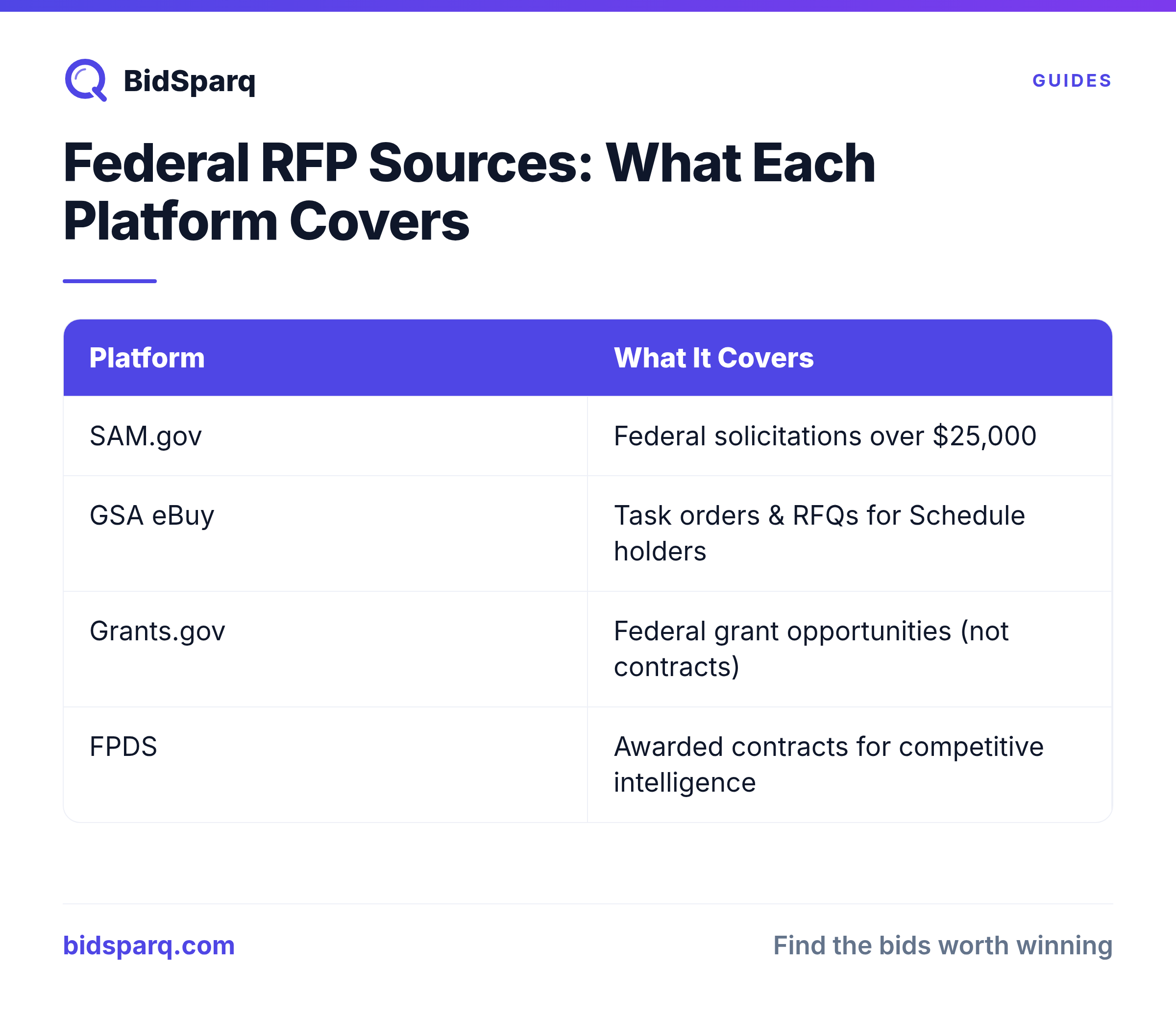
SAM.gov is the single largest source of federal contract opportunities. Every federal agency is required to post solicitations over $25,000 here. You can search by NAICS code, set-aside type, place of performance, and keyword.
GSA eBuy handles solicitations for GSA Schedule holders. If you're on a GSA contract vehicle, this is where task orders and RFQs appear.
Grants.gov lists federal grant opportunities: not contracts, but a major funding source for nonprofits, universities, and research organizations.
FPDS (Federal Procurement Data System) tracks awarded contracts. While not a source of open solicitations, it's invaluable for competitive intelligence: you can see who won what, for how much, and when contracts are up for recompete.
State and Local RFPs
Every state has its own procurement portal. Some of the larger ones include:
- Texas SmartBuy: Texas state procurement
- Cal eProcure: California procurement
- BuySpeed / Jaggaer: Used by many state and local agencies
- IonWave / BonFire: Popular platforms used by hundreds of cities and counties
The challenge with state and local procurement is fragmentation. There's no single portal: opportunities are scattered across city websites, county purchasing departments, school district platforms, and regional transit authorities. For a state-by-state breakdown, see our State Procurement Portals Guide.
Education RFPs
School districts and universities post RFPs on platforms like PEPPM, BuyBoard, E-Rate (USAC), and individual district procurement pages. Education procurement is often overlooked but represents billions in annual spending on IT, facilities, and services.
Cooperative Purchasing
Cooperative purchasing contracts through organizations like BuyBoard, SourceWell, and TIPS-USA let you sell to thousands of agencies under a single contract vehicle. These are some of the most efficient paths to government revenue.
How to Find RFPs for Free
You don't need a paid subscription to start finding RFPs. Here are the best free methods:
- SAM.gov: The gold standard for federal opportunities. Free to search, free to set up email alerts. See our SAM.gov search tips for advanced techniques.
- State procurement portals: Every state has a free bid board. Texas SmartBuy, Cal eProcure, eVA (Virginia), and others are all free to browse.
- City and county websites: Check the "Purchasing" or "Procurement" section of your local government's website. Many post bids directly.
- Google Alerts: Set up alerts for terms like "request for proposal [your industry]" or "RFP [your city]" to catch opportunities posted on agency websites.
- USASpending.gov: Not for open RFPs, but free data on who holds current contracts, so you know when recompetes are coming.
- FPDS.gov: Free federal contract award data for competitive research.
- Agency RSS feeds and mailing lists: Some agencies offer email subscriptions for new solicitations. Check the procurement page of agencies you sell to.
The limitation of free methods: They work, but they're manual. You're checking 10-50 different websites, each with its own interface and search quirks. Most contractors who rely solely on free sources estimate they spend 5-10 hours per week just searching, and still miss opportunities.
How to Search SAM.gov Effectively
SAM.gov's search can be frustrating if you don't know the tricks:
- Use NAICS codes, not just keywords. Keywords miss opportunities with different terminology. Your NAICS code captures all solicitations in your industry regardless of how the contracting officer wrote the title. Learn how to find your NAICS code.
- Filter by set-aside type. If you're a small business with certifications: 8(a), HUBZone, SDVOSB, or WOSB, filter to your set-aside to find opportunities where you have a competitive advantage.
- Check the "Modified" date. Amendments and modifications to existing solicitations often extend deadlines or change requirements: these are opportunities others miss.
- Search for Sources Sought and RFIs. These pre-solicitation notices tell you what's coming before the RFP drops, giving you more time to prepare.
Finding RFPs on LinkedIn
LinkedIn isn't a procurement portal, but it's a useful supplementary source:
- Follow agency procurement offices. Many federal and state procurement teams post upcoming solicitations on LinkedIn before or alongside the formal posting.
- Join government contracting groups. Groups like "Government Contractors Network" and "Small Business Government Contracting" share opportunities and teaming partner requests.
- Connect with contracting officers. Building relationships with CORs and contracting officers helps you hear about opportunities before they're published.
- Search for "Sources Sought" posts. Some agencies share pre-solicitation notices on LinkedIn as a way to reach industry.
LinkedIn is best for relationship-building and early intelligence: not as a primary RFP search tool.
RFP Search Platforms Compared
If manual searching isn't cutting it, paid platforms can automate the work. Here's how the major options compare:
| Platform | Price | Sources | AI Features | Best For |
|---|---|---|---|---|
| GovWin IQ | $15-25k/yr | Federal + some SLED | Basic matching | Large firms with big BD budgets |
| BidNet Direct | ~$2k/yr | Mixed federal/state | Keyword search only | Budget-conscious, title-level search |
| HigherGov | Enterprise | Federal + some SLED | Market intel | Federal pipeline tracking |
| GovSignals | $49-99/mo | Federal focus | Alerts | Federal opportunity alerts |
| FindRFP | Free + paid | Federal focus | Basic filtering | Free starting point |
| BidSparq | $249/mo | 23,000+ sources | AI scoring, compliance checklists, competitive intel, proposal drafts | SMBs who want GovWin-quality intel at 1/20th the price |
"GovWin IQ does this but is way too expensive ($15-25k a year). I'm paying for BidNet which is about $2k a year but only seems to search the title description." (r/GovernmentContracting)
The biggest gap in the market is between free SAM.gov and $15k+ enterprise tools. Most small and mid-size contractors need something in between: broad source coverage with intelligent matching, at a price that doesn't eat into margins. For a detailed breakdown of each platform, read our Best RFP Search Platforms Compared (2026) guide.
Finding RFPs for Small Businesses
Small businesses have a significant advantage in government procurement thanks to set-aside programs. The federal government is required to award at least 23% of prime contract dollars to small businesses.
Where to focus:
- Set-aside filtered searches on SAM.gov: Filter by Total Small Business, 8(a), HUBZone, SDVOSB, or WOSB set-asides.
- SBA's Dynamic Small Business Search: Gets your firm in front of large primes looking for subcontractors.
- SubNet (SBA): Subcontracting opportunities posted by large primes. A great way to build past performance.
- State and local contracts: Many state and local agencies have their own small business preferences and goals.
The key insight: small businesses win by being selective, not by bidding everything. A disciplined bid/no-bid process is the single highest-leverage change you can make.
"The most expensive thing a small contractor can do is spend three weeks writing a proposal for an opportunity they had no realistic chance of winning." (r/GovernmentContracting)
For a deep dive on search strategies, certifications, and common mistakes, read our dedicated guide on how to find RFPs for small businesses.
Setting Up RFP Alerts That Work
The best way to find RFPs is to stop searching and let them come to you:
- SAM.gov saved searches: Save your NAICS code + set-aside filters and enable email notifications. You'll get daily digests.
- State portal alerts: Most state bid boards let you subscribe to notifications by commodity code.
- Google Alerts: Set up alerts for your company name, competitor names, and key terms to catch opportunities posted on agency websites.
- Automated matching tools: Platforms like BidSparq scan 23,000+ sources and deliver AI-scored matches to your dashboard and inbox, ranked by fit.
The difference between manual alerts and AI-matched alerts: manual alerts flood your inbox with everything that matches a keyword. AI matching scores each opportunity against your actual capabilities and only surfaces the ones worth pursuing.
The Problem with Manual Searching
Even if you master SAM.gov, you're still only searching one portal. A typical IT services firm should be monitoring SAM.gov, GSA eBuy, their state portal, nearby county and city procurement pages, education platforms, and transit authorities. That's easily 20-50 different websites.
"The fragmentation is wild." (r/GovernmentContracting)
Most contractors solve this by:
- Dedicating a BD team member to search portals every morning (expensive)
- Subscribing to aggregators like GovWin or BidNet (expensive, often incomplete)
- Only searching 2-3 portals and hoping for the best (risky)
And then there are the registration walls:
"I'm so tired of clicking links only to be met with 'You must register on our county-specific site.' My list includes IonWave, Bonfire..." (r/GovernmentContracting)
BidSparq scrapes behind these registration walls: IonWave, Bonfire, PlanetBids, DemandStar, and more, so you see the opportunities without creating an account on every platform.
Tired of checking dozens of portals?
BidSparq monitors 23,000+ sources and uses AI to score every RFP against your profile. See your top matches in one dashboard: no more portal-hopping.
Start Free 14-Day Trial →Automating RFP Discovery
The most efficient approach is automated matching. Instead of searching portals, you define your capabilities once: NAICS codes, keywords, certifications, geographic preferences, contract size range, and let software scan every portal for you.
BidSparq monitors 23,000+ procurement sources daily and uses AI to score each opportunity against your business profile. For every matched RFP, you get:
- AI Win Score: How well this opportunity fits your business (Shipley Pwin methodology)
- Should I Bid? verdict: Pursue, Consider, or Skip with reasoning
- Compliance Checklist: Every mandatory requirement extracted from the RFP documents
- Competitive Intelligence: Who holds the current contract, award amounts, and recompete history
- Proposal Draft: AI-generated outline tailored to the specific RFP requirements
This means you spend 10 minutes reviewing pre-scored matches instead of 8 hours searching portals.
Frequently Asked Questions
What is the best website to find government contracts?
For federal contracts, SAM.gov is the best free website: it lists every federal opportunity over $25,000. For state, local, and education contracts there is no single official site; they are spread across thousands of separate portals. If you sell across multiple levels of government, an aggregator like BidSparq is the most practical option: it monitors 23,000+ federal, state, local, and education sources in one place and scores each opportunity against your business. Start with SAM.gov if you only pursue federal work, and add an aggregator once you are tracking state and local contracts too.
How can I find government RFPs online?
Start with SAM.gov for federal opportunities, then check your state procurement portal for state and local bids. For broader coverage across 23,000+ sources, tools like BidSparq aggregate RFPs from federal, state, local, education, and commercial sources into a single dashboard.
What platforms help in searching for RFPs in the US?
The main platforms include SAM.gov (free, federal only), BidNet (~$2k/yr), GovWin IQ ($15-25k/yr), and BidSparq ($249/mo). See our platform comparison table above for a detailed breakdown.
Where can I find RFPs for small business contracts?
Filter SAM.gov searches by set-aside type (8(a), HUBZone, SDVOSB, WOSB). Also check SBA's Dynamic Small Business Search and SubNet for subcontracting opportunities. Read our set-aside programs guide for details on qualifying.
What are the best websites to find technology RFPs?
For IT and technology RFPs: SAM.gov (federal IT contracts), GSA eBuy (GSA Schedule orders), state procurement portals, and E-Rate/USAC for education technology. BidSparq monitors all of these plus hundreds of city, county, and agency-specific portals.
How do I sign up for alerts on new RFP postings?
On SAM.gov, save your search filters and enable email notifications. On state portals, subscribe by commodity code. For automated AI-scored alerts across 23,000+ sources, sign up for BidSparq: matched RFPs are delivered to your dashboard and weekly email digest.
Next Steps
- Start your free 14-day trial to see matched RFPs from 23,000+ sources
- Read our guide on RFP vs RFQ vs IFB to understand solicitation types
- Learn about set-aside programs and how to qualify
- Master SAM.gov search tips for better federal results
- Explore all 50 state procurement portals
Find RFPs that match your business
BidSparq monitors 23,000+ procurement sources and uses AI to score every opportunity against your capabilities. Try it free for 14 days.
Start Free Trial →