Using Claude (or ChatGPT) to monitor government RFPs: a working setup, not a hype piece
How to wire up an LLM to a live RFP database so you can ask 'what's new in my space this week?' in plain English, and get actual answers, not hallucinations. Covers MCP servers, what's possible today, and the limits.
If you've spent any time on government contracting Twitter or LinkedIn lately, you've probably seen people claim they're using Claude or ChatGPT to "find RFPs." The honest version is: most of those people are copy-pasting a few RFPs into a chat and asking the LLM to summarize them. That works. It's also not the same thing as monitoring RFPs.
Real RFP monitoring with an LLM means: every new opportunity that posts to SAM.gov or your state portal flows into a system your AI assistant can query directly. You can ask "what new federal IT contracts under $500K showed up this week in the small-business set-aside?" and get a real answer: pulled from actual data, not made up.
That's possible today. It requires one specific thing: a Model Context Protocol (MCP) server that exposes RFP data to your LLM. This post walks through what that means, what's actually possible, and what the limits are.
Why "just asking ChatGPT about RFPs" doesn't work
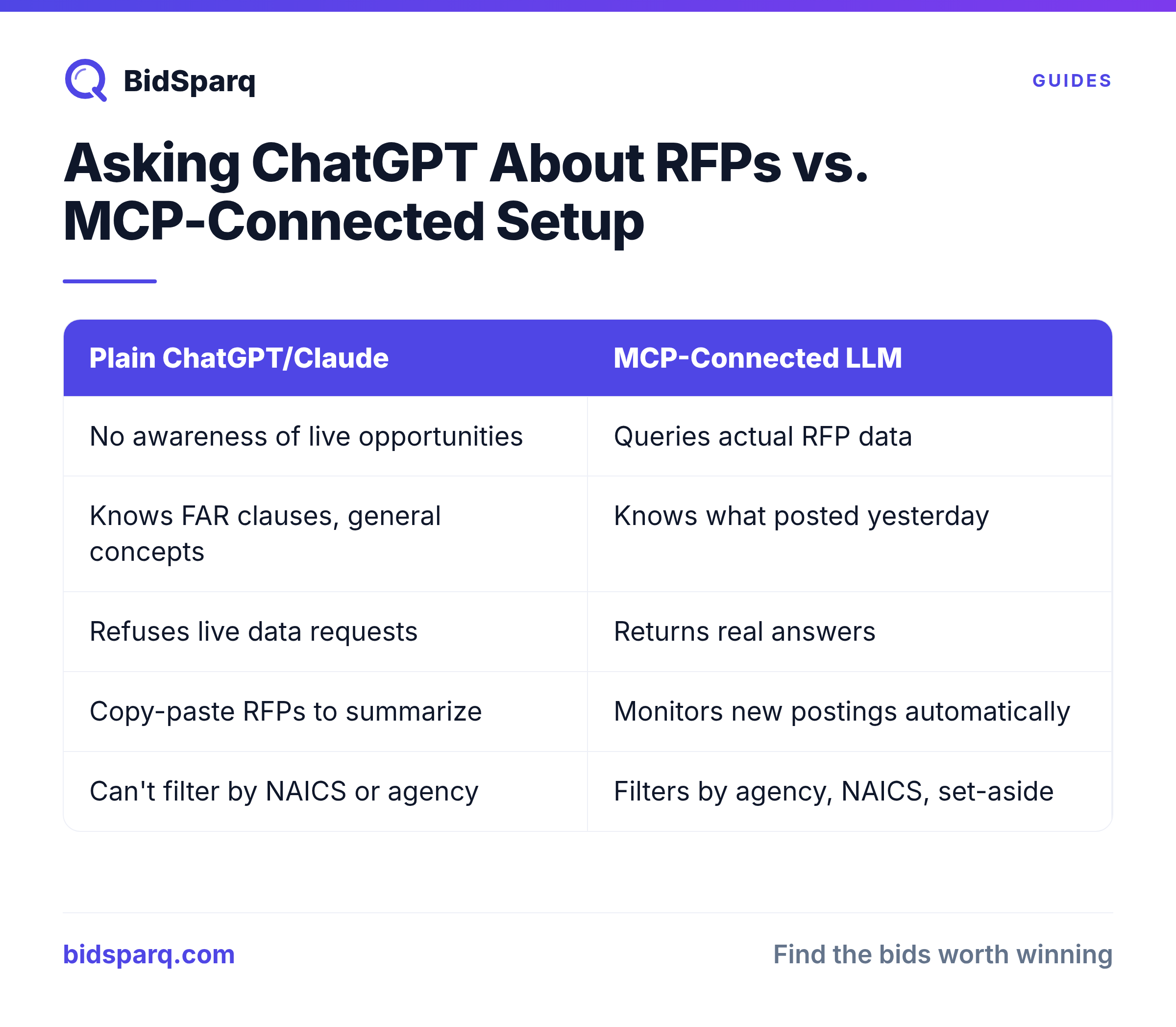
Out of the box, ChatGPT and Claude don't know about government RFPs. They have training-data knowledge of the procurement system, FAR clauses, and general government-contracting concepts, but they have zero awareness of any specific live opportunity. They don't know what posted to SAM.gov yesterday. They can't tell you which agencies just released NAICS 541512 contracts in your state.
If you ask ChatGPT "what new federal RFPs were posted this week," one of three things happens:
- It refuses and tells you it doesn't have access to live data. Best-case outcome.
- It hallucinates a list of plausible-sounding RFPs that don't exist. Worst-case outcome: you waste hours chasing imaginary contracts.
- It web-searches, finds a few SAM.gov listings if you're lucky, and summarizes them poorly. Inconsistent.
The fundamental gap: LLMs are good at understanding RFPs and reasoning about them. They're not good at knowing what RFPs exist. To close that gap, the LLM needs a tool that gives it access to a live RFP database.
What is the Model Context Protocol (MCP)?
MCP is an open protocol: originally specified by Anthropic in late 2024, that defines how an LLM client (Claude Desktop, Cursor, ChatGPT with the right setup, custom agents) talks to external tool servers. Think of it as a standardized way to plug capabilities into an LLM.
An MCP server publishes a list of "tools": named functions the LLM can call. Each tool has a JSON schema describing its inputs and outputs. The client (Claude, Cursor, etc.) reads the tool list, decides when to call which tool based on what you're asking, and sends the result back to the LLM's reasoning loop.
Example: BidSparq's MCP server publishes tools like filter_rfps, get_agency_profile, find_recompetes, search_historical_bids, and get_trending. When you ask Claude "what new HHS IT contracts under $500K posted this week," Claude figures out it should call filter_rfps with parameters {agency: "HHS", naics_prefix: "5415", max_value: 500000, posted_after: "2026-05-18"}, gets the actual results, and writes them up for you. No hallucination. No copy-paste.
What MCP enables for RFP monitoring (a real list)
With an MCP server connected, you can:
- Ask in plain English, every day: "what's new in my pipeline this morning?" or "any 8(a) set-asides in NAICS 541512 that closed yesterday?" The LLM translates your question into the right query.
- Get explanations, not just listings. "Why did you flag this one for me?" The LLM can pull the AI scoring breakdown, the agency's recompete history, and the incumbent vendor profile and explain its reasoning.
- Run multi-step analyses. "Compare these three RFPs. Which has the lowest wired-risk score? Show me the awarded incumbent for each, and check whether any of them won the last recompete in this NAICS." The LLM strings together multiple tool calls and synthesizes an answer.
- Track agencies over time. "What's the average award value at NIH for NAICS 541512 over the last three years, and how does that compare to NSF?" Real data, real numbers.
- Generate proposal sections. "Draft a past-performance section pulling from my last three federal wins." The LLM has access to your own pursuit history if you grant it.
- Automate triage. "Every weekday at 9am, pull the new opportunities matching my profile and write me a summary of the top 5." This requires scheduled execution, but the underlying queries are the same.
How to set this up (the actual steps)
You need three things: an MCP-capable client, an MCP server with RFP data, and credentials to authenticate.
Step 1: Pick an MCP-capable client
As of mid-2026, the working clients are:
- Claude Desktop (Anthropic): best support, native MCP integration, OAuth flow for remote servers
- Cursor: strong support, used by developers integrating LLMs into code workflows
- ChatGPT with custom GPT or Code Interpreter: possible but less polished. ChatGPT's connector ecosystem is catching up to Anthropic's but lags as of this writing.
- Custom agents via the MCP SDKs (TypeScript, Python): for building your own agent or scripted workflow
For a non-developer, Claude Desktop is the easiest path. Install it, configure the MCP connection, authenticate, done.
Step 2: Pick an RFP MCP server
As of mid-2026, the production-ready RFP MCP servers are:
- BidSparq: 75 tools, OAuth 2.1, hosted at
https://bidsparq.com/mcp, included in any paid BidSparq subscription. Covers federal (SAM.gov), state, local, education, healthcare RFPs plus award history, vendor profiles, buyer-side procurement-officer contacts, federal contract vehicles (GWACs / FSS / BPAs), and capture management. - GovTribe: launched Feb 2026, federal-focused, requires a GovTribe subscription. Strong on federal pipeline intelligence.
- Custom servers: you can build your own MCP server that wraps SAM.gov's public API. The free-tier limits make this impractical for serious use but it's a learning exercise.
The choice depends on your market. Federal-only: GovTribe or BidSparq. Mixed federal + state + local + education: BidSparq is the only option with broad coverage.
Step 3: Authenticate
Modern MCP servers (BidSparq, GovTribe) use OAuth 2.1. In Claude Desktop, that means:
- Go to Settings → Connections → Add Connection
- Enter the server URL (e.g.,
https://bidsparq.com/mcp) - Claude opens a browser window to your account
- You log in and approve the connection
- Claude gets a token, stores it, and starts using it for tool calls
For Cursor or a custom agent, the flow is similar but configured via the MCP server's URL or a config file.
Example queries that actually work
These are real queries you can run today against an RFP MCP server. The output is fast (under 10 seconds typically) and grounded in actual data.
Daily triage:
What new RFPs posted to SAM.gov in NAICS 541512 (Computer Systems Design) in the last 48 hours? Filter for set-aside 8(a) or small business. Show me the top 5 by AI fit score.
Agency intelligence:
Who's the top vendor at NIH for NAICS 541511? How many contracts have they won in the last 3 years, and what's their average award value? Are any of those recompeting soon?
Bid/no-bid decision:
Pull RFP 70Z02324RNAVY00012. Score the wired-risk signals. Show me the incumbent, their award history, and the response window. Should I bid?
Recompete monitoring:
Show me federal contracts in NAICS 541330 expiring in the next 6 months where the period of performance is ending and the agency hasn't announced a recompete yet.
Capture-management workflow:
What's in my Pursuits pipeline right now? Show me weighted value by stage, the three pursuits with the highest Pwin, and any next-action items overdue.
What doesn't work (and the honest limits)
MCP-powered RFP monitoring isn't magic. Here's what fails or works poorly:
- Real-time alerts. MCP is request-response: you ask, the LLM queries, you get an answer. It doesn't push notifications. If you want "tell me the second a new IT RFP posts," you still need email alerts or a webhook system. (BidSparq sends a weekly digest email for this.)
- Hallucination at the edges. The LLM can still make mistakes about data it isn't looking at directly. If you ask "based on what you just told me, what's the best NAICS code for this work?": the LLM will reason from training data, not the live database. Always anchor follow-up questions back to real tool calls.
- Proposal writing. The LLM can draft sections, but the final proposal needs human capture-management judgment. Compliance matrices, win themes, pricing strategy: these aren't MCP problems.
- Data coverage. The MCP server only knows what its underlying database knows. If the source doesn't scrape a particular state portal or school district, the LLM can't find RFPs there. Always verify what sources the server actually covers.
- Latency on multi-step queries. A 5-tool-call analysis takes 20-40 seconds. Not slow, but not instant.
- Cost. Each tool call uses LLM tokens. Heavy daily usage runs $5-20/month in API costs on top of the MCP server subscription. Most users won't notice; high-volume agent users will.
The emerging pattern: LLM as control plane, MCP as data plane
The bigger trend behind all of this: instead of opening a portal, running searches, exporting CSVs, and pasting data into ChatGPT, your LLM is the interface. You ask in natural language. It runs the right queries against the right systems. It writes up the answer.
For government contractors, this shifts what's possible. A solo BD person at a 10-person shop can now run analyses that previously required a dedicated capture-management analyst. The big-firm advantage isn't the analyst anymore: it's whether they're paying $25,000/year for the tool that LLM is reading from, or $249/month.
Getting started with BidSparq + Claude
If you want to try this today:
- Sign up for BidSparq (14-day free trial, no credit card)
- Open BidSparq Settings → API Keys → Create API key
- Install Claude Desktop
- In Claude Desktop: Settings → Connections → Add Connection → enter
https://bidsparq.com/mcp - Authenticate with your BidSparq account
- Try: "What new RFPs match my profile this week?"
The MCP integration is included in every paid tier: no separate charge. The Pro Max tier adds Pursuits-management tools to the MCP server, so you can run your full capture workflow from Claude.
Related reading
- Contract vehicle intelligence: 64,849 federal IDVs queryable from your AI chat, GWACs, GSA Schedules, BPAs and more, now in the MCP toolset
- Beacon: 85,978 procurement officers queryable from your AI chat, what the contact graph adds to your MCP toolset
- How to Forecast Your Government Contracts Pipeline: the Shipley math behind the Pursuits tools
- How to Spot a Wired Contract: the 6 wired-risk signals the MCP server can score for you
- How to Bid on Government Contracts: the full procurement workflow, end to end
- All BidSparq features: what's in the platform that the MCP server can query
Find RFPs that match your business
BidSparq monitors 23,000+ procurement sources and uses AI to score every opportunity against your capabilities. Try it free for 14 days.
Start Free Trial →