How to spot a wired government contract: 6 signals you're wasting your time
A wired contract is one where the agency has already decided who wins: before the RFP goes public. Here are 6 signals you can check yourself, in under 5 minutes, to avoid spending 80 hours writing a proposal you were never going to win.
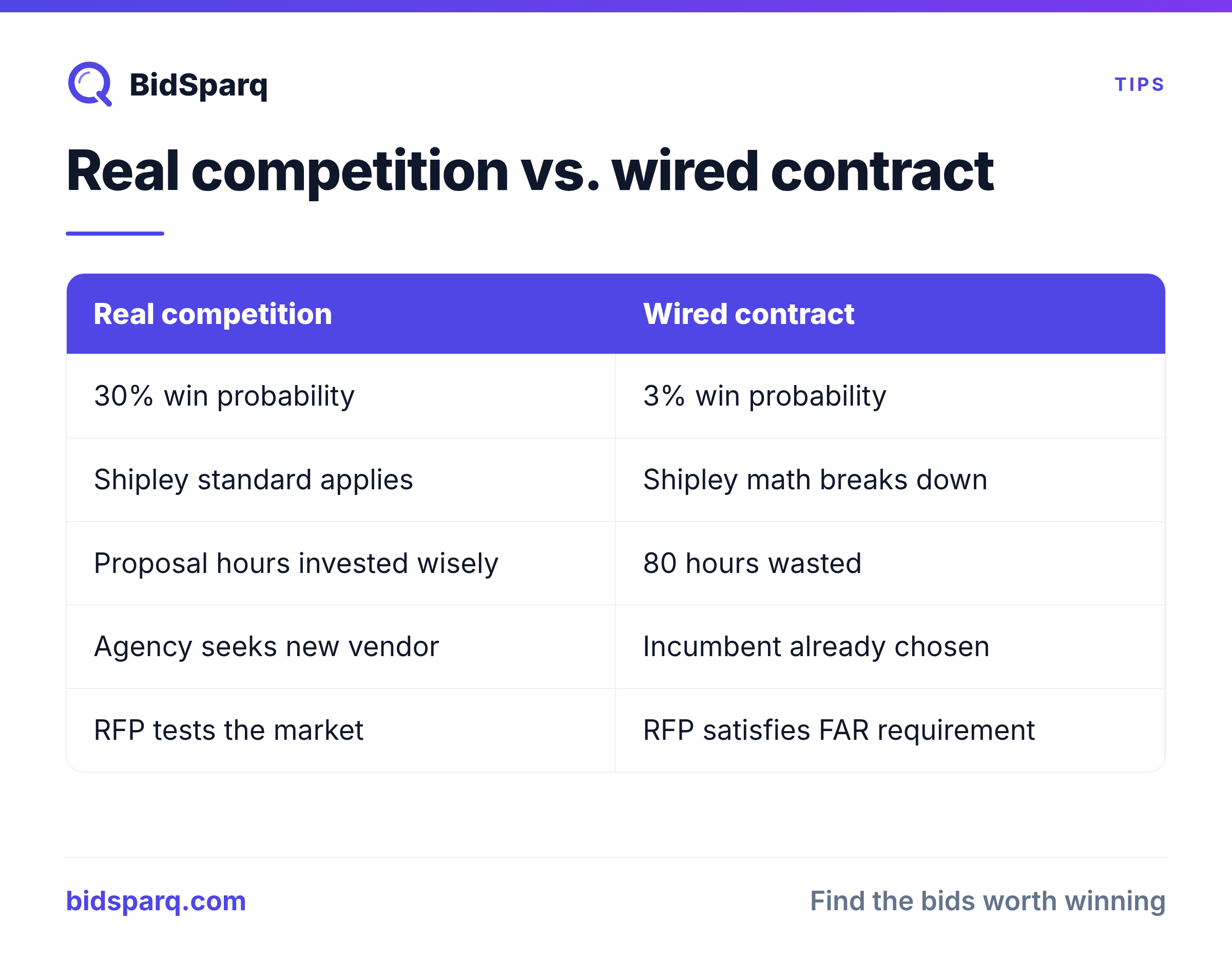
Every small government contractor learns this lesson the expensive way. You spot an RFP, the requirements look like a perfect fit, you spend 80 hours writing a proposal, and then the contract goes to the incumbent who's been doing the work for six years and has the contracting officer's personal cell number.
That's a wired contract. The agency has already decided who they want to win. The RFP is being run because competition is required by FAR: not because anyone actually expects a new vendor to displace the incumbent. Most contractors realize this only after they've already invested the labor.
You don't have to. There are six signals you can check on any RFP, in less than five minutes, that tell you whether you're bidding against a real competition or you're providing "at least three offers" for someone else to win. This post walks through each signal: what it looks like, why it matters, and how to find it in the actual RFP documents.
Why this matters more than the win-rate math
The Shipley standard for government contracting says you should bid only when your win probability is at least 30%. That math assumes the contract is genuinely competitive. When a contract is wired, your win probability is closer to 3%: regardless of how qualified you are, how good your proposal is, or how aggressive your price.
The cost of bidding on the wrong RFP isn't just the proposal hours. It's the opportunity cost of not bidding on the next RFP you should have pursued. A small contractor who writes three proposals a quarter can't afford to waste one on a contract that's already been decided.
Spotting wired contracts is the highest-leverage skill in the bid/no-bid workflow. Once you can do it reliably, your win rate goes up: not because your proposals got better, but because you stopped bidding the wrong contracts.
The six signals (in priority order)
Signal 1: A repeat incumbent at the same agency in the same NAICS
If the same vendor has won the same agency's contracts in the same NAICS code two or more times in the past five years, you're looking at an incumbent advantage. The agency knows their team. The contracting officer trusts their performance. The technical evaluators have probably worked with them through three contract cycles.
Where to find it: USASpending.gov shows every federal award. Filter by agency, then by NAICS, and sort by recipient name. If you see the same UEI or DBA repeatedly, you have an incumbent. BidSparq surfaces this automatically on every RFP: we cross-check against 164,000 federal awards and flag the top incumbent vendor when the same recipient has won twice or more.
How to weight it: Incumbent presence alone isn't fatal. Many recompetes are legitimate. But combine incumbent presence with any of the next five signals and the picture gets darker fast. If the incumbent has multiple non-competed (sole-source) awards in the same NAICS, that's a strong wired signal: the agency has already signaled they prefer to skip the competition step when allowed.
Signal 2: A response deadline that's too short for the scope
Government RFPs typically allow 30-45 days to respond. When you see a 14-day window for a 50-page technical volume, that's a flag. Either the agency made a scheduling mistake (rare) or someone has been working on the technical solution for weeks already.
The math: a serious technical proposal for a medium-complexity RFP needs roughly 60-80 hours of effort across writing, review, and compliance. If the deadline doesn't allow that for a new bidder, the agency is either accepting low-quality responses (the "three offers" pattern) or they've already coordinated the timeline with someone who started earlier.
Where to find it: Compare the "response due date" against the publication date. For RFPs marked medium or high complexity (look at the page count, the number of technical volumes, and the evaluation factor count), a window under 14 days is a wired signal. BidSparq scores this automatically: RFPs with short response windows relative to complexity get a +20 on the wired-risk composite.
Signal 3: "Intent to award" or sole-source-justification language
Sometimes the agency tells you directly. Look for phrases like:
- "The Government intends to award this contract to [vendor]"
- "Sole source justification"
- "Only one responsible source"
- "Brand name or equal": followed by a specific product/vendor
- "Limited sources justification"
This language usually appears in "Sources Sought" notices, draft RFPs, or in the synopsis section of the actual RFP. When you see it, the agency is publicly stating they've already identified a preferred vendor. You can still file a protest if you believe you can perform, but you're fighting a presumption, not competing for a contract.
Where to find it: Search the RFP's synopsis and statement-of-work sections for these phrases. BidSparq's AI enrichment flags "intent_to_award" as a wired signal automatically, scanning every RFP for these and adjacent phrases.
Signal 4: Brand-name requirements without "or equal"
Federal Acquisition Regulation (FAR 11.104) requires agencies to use "brand name or equal" specifications when they need a particular product feature: they must allow equivalent products from other vendors. When you see a brand-name specification without the "or equal" language, or with requirements that effectively only one vendor can meet, the contract is wired to that vendor's product.
Common patterns:
- Specifying a vendor-proprietary feature as a mandatory requirement
- Listing certifications that only the incumbent currently holds (with no path for new bidders to acquire them in time)
- Requiring "experience with [the agency's specific system]" where that system was custom-built by one vendor
- Naming a specific software product without "or equivalent"
Where to find it: Read the technical requirements section (usually Section C or the Statement of Work). Look for any brand name, model number, or vendor-specific feature. If it's there without "or equal" or "or equivalent," the agency has either made a procurement mistake or wired the contract.
Signal 5: A thin Performance Work Statement for a high-value contract
This one's counterintuitive but reliable. When a high-value contract ($500K+) has a Performance Work Statement (PWS) that fits on two pages, the agency isn't telling new bidders enough to write a competitive proposal: they're assuming the winning vendor already knows what needs to be done.
A real $1M contract with a real competition gets a 30-page PWS. The agency wants new bidders to be able to scope the work accurately. When the PWS is intentionally vague, it's because the agency expects only the incumbent (who has the historical context) to bid intelligently.
Where to find it: Read the PWS or Statement of Work. Count the pages. Compare against the contract value. If the contract value per page of PWS is unusually high: anything over $200K per page is a flag, the document is suspiciously thin. BidSparq scores "thin_pws" as a wired signal when the description is under 200 words for a contract valued over $500K.
Signal 6: Language that describes one specific competitor
This is the subtlest signal and the hardest to spot without practice. The technical requirements describe a system or capability that matches one specific vendor's product description, sometimes word-for-word.
Examples:
- The required technical approach uses phrasing copied from a vendor's marketing page
- Required "qualifications" match a specific vendor's certifications exactly
- The contract title or description uses internal product names from one vendor
- The evaluation criteria weights features that one vendor's product happens to be uniquely strong on
Where to find it: Google the most-unusual technical phrases from the RFP in quotes. If the same phrases appear on a specific vendor's website, the agency wrote the RFP with that vendor's product in mind. BidSparq's AI enrichment flags "competitor_specific_language" when this pattern is detected during RFP analysis.
How to combine the signals: the composite score
No single signal is fatal. Lots of legitimate contracts have one or two of these patterns by accident: agencies are bureaucracies, not conspiracies. The signal that matters is the composite.
BidSparq calculates a wired-risk score 0-100 by adding:
- +20 if an incumbent has 2+ awards in the same agency + NAICS in the past 3 years
- +5 bonus if the incumbent has non-competed (sole-source) awards in that window
- +20 if the response window is short relative to complexity (≤14 days medium, ≤21 days high)
- +15 for intent-to-award keywords in title or description
- +15 for brand-name lock without "or equal"
- +15 for thin PWS (high value, sub-200-word description)
- +15 for competitor-specific language detected by the AI enrichment pass
Score thresholds:
- 0-25: Probably a real competition. Bid if it's a fit.
- 26-50: Caution. One signal is firing. Read carefully and consider asking questions during the Q&A period.
- 51-75: Warning. Multiple signals. The contract is probably leaning toward an incumbent. Don't bid unless you have a specific reason to compete (existing relationship, unique differentiator, strategic positioning).
- 76-100: High risk. This contract is wired. Skip it and spend the hours on a better-targeted opportunity.
What to do when you spot a wired contract
You have three options.
Option 1: Skip it. The default. Your 80 hours are worth more on a competition you can win. Move on.
Option 2: Ask questions during the Q&A period. Most RFPs have a formal Q&A window where you can submit written questions. Use it. Ask "Can you clarify the brand-name lock in Section C.2? Is 'or equivalent' acceptable?" or "Will the response window be extended given the technical complexity?" You're putting the agency on notice that the wired nature is visible. Sometimes: not often, but sometimes, the agency will issue an amendment that opens up the competition.
Option 3: File a protest before award. This is the nuclear option. GAO protests cost time and goodwill, and the agency will remember. But if a contract is genuinely wired in violation of FAR (no "or equal," inadequate justification for sole-source, etc.), a pre-award protest can force them to recompete. Only do this when you have clear evidence and a real intent to bid the recompete.
For most small contractors, Option 1 is right 90% of the time. The energy you save goes to finding the next opportunity: one where you actually have a chance.
How to find non-wired contracts faster
Once you know what wired contracts look like, the next question is how to find the opposite: contracts where the competition is genuinely open. Three patterns to look for:
- New requirements at agencies you haven't worked with: first-time procurements have no incumbent to favor
- Sources Sought notices that describe the requirement broadly: agencies in early-stage capability research are looking for new vendors, not validating their preferred one
- Set-aside contracts under $250K: micro-purchases and small set-asides go to whoever responds first with a qualifying proposal, not whoever the program officer prefers
BidSparq surfaces all three patterns automatically. Every RFP gets the wired-risk score, the set-aside type, the agency's recompete history, and a comparison to your specific business profile. You see the wired signals before you start the proposal: not after.
Try BidSparq free for 14 days → See the wired-risk score on every active RFP, plus AI matching against 23,000+ procurement sources.
Related reading
- The Bid / No-Bid Decision Framework: the broader analytical approach to deciding which RFPs to chase
- Contract vehicle intelligence: surface the parent vehicle behind a suspicious solicitation
- How to Read an RFP (the parts that actually matter): find the wired signals faster
- How to Bid on Government Contracts: the full procurement workflow, end to end
Find RFPs that match your business
BidSparq monitors 23,000+ procurement sources and uses AI to score every opportunity against your capabilities. Try it free for 14 days.
Start Free Trial →