NAICS Codes Explained: How to Find Yours and Why It Matters for Government Contracts
Learn what NAICS codes are, how to find the right codes for your business, and why they're critical for winning government contracts and getting matched with the right RFPs.
Every government contract is classified by a NAICS code. If you pick the wrong code, or don't know your codes at all: you'll miss opportunities, lose set-aside eligibility, and wonder why your searches return irrelevant results.
NAICS codes are the single most important classification system in government procurement. Here's everything you need to know.
What Are NAICS Codes?
NAICS (North American Industry Classification System) codes are 6-digit numbers that classify every business in the U.S., Canada, and Mexico by industry. The federal government uses them to:
- Categorize contract opportunities: every solicitation on SAM.gov has a NAICS code
- Determine small business size standards: your eligibility for set-asides depends on your NAICS code
- Track spending by industry: agencies report how much they spend per NAICS code
- Match contractors to opportunities: your SAM.gov registration lists your NAICS codes
How NAICS Codes Are Structured
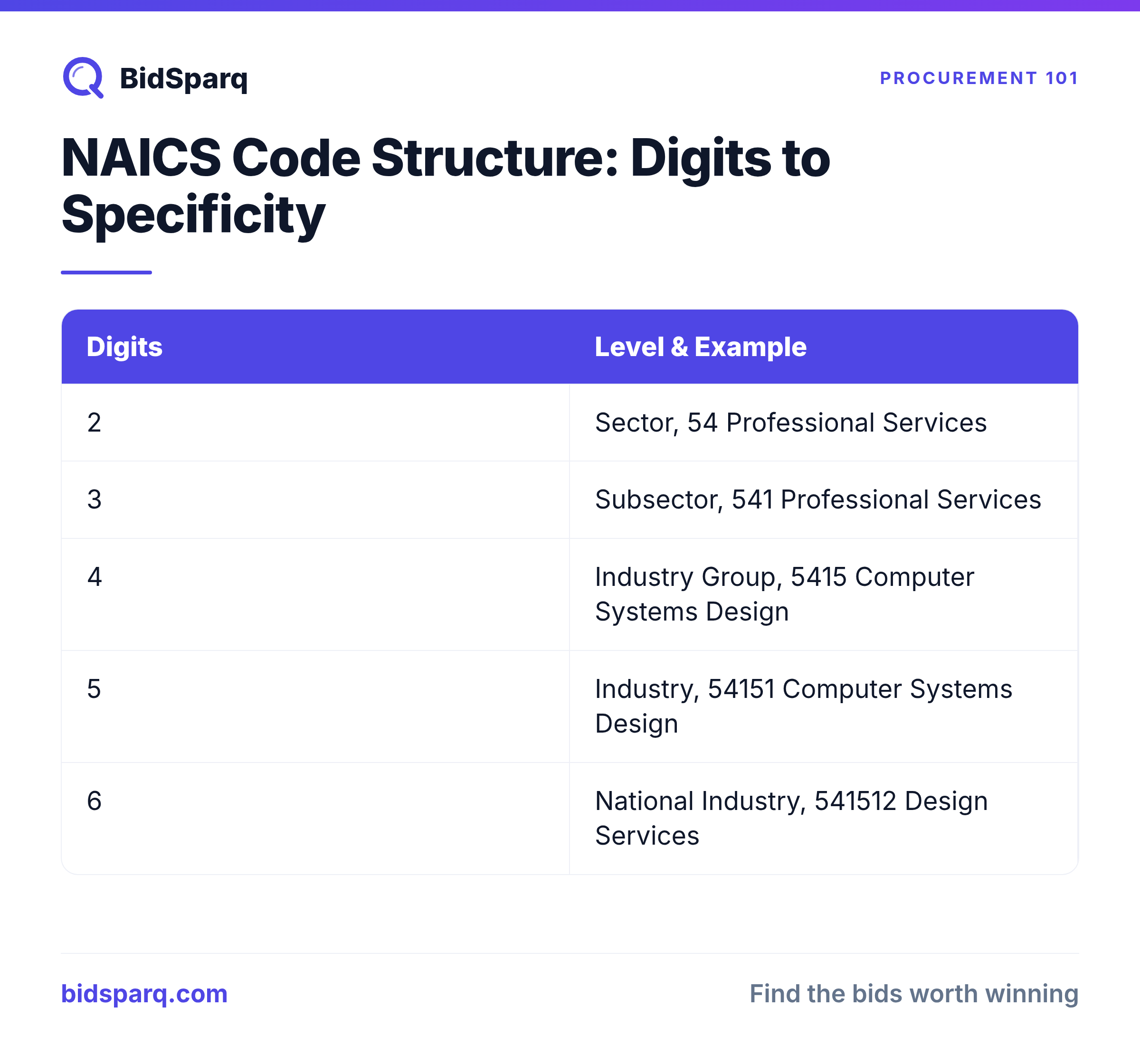
NAICS codes follow a hierarchical structure from broad to specific:
| Digits | Level | Example |
|---|---|---|
| 2 digits | Sector | 54: Professional, Scientific, and Technical Services |
| 3 digits | Subsector | 541: Professional, Scientific, and Technical Services |
| 4 digits | Industry Group | 5415: Computer Systems Design and Related Services |
| 5 digits | Industry | 54151: Computer Systems Design and Related Services |
| 6 digits | National Industry | 541512: Computer Systems Design Services |
Government contracts use the full 6-digit code. When searching for opportunities, you can search at the 4- or 5-digit level to cast a wider net.
Common NAICS Codes by Industry
IT Services & Cybersecurity
- 541512: Computer Systems Design Services
- 541511: Custom Computer Programming Services
- 541519: Other Computer Related Services
- 541513: Computer Facilities Management Services
- 518210: Data Processing, Hosting, and Related Services
Construction
- 236220: Commercial and Institutional Building Construction
- 237310: Highway, Street, and Bridge Construction
- 238210: Electrical Contractors
- 238220: Plumbing, Heating, and Air-Conditioning Contractors
Consulting & Professional Services
- 541611: Administrative Management and General Management Consulting
- 541612: Human Resources Consulting Services
- 541618: Other Management Consulting Services
- 541690: Other Scientific and Technical Consulting Services
Engineering
- 541330: Engineering Services
- 541380: Testing Laboratories
Staffing
- 561320: Temporary Help Services
- 561311: Employment Placement Agencies
Janitorial & Facilities
- 561720: Janitorial Services
- 561210: Facilities Support Services
- 561730: Landscaping Services
Security
- 561612: Security Guards and Patrol Services
- 561621: Security Systems Services (except Locksmiths)
How to Find Your NAICS Code
- Search the official NAICS database at census.gov/naics. Enter keywords describing your work and browse the results.
- Check your competitors. Look up competitors in SAM.gov's entity search and see what NAICS codes they registered under.
- Look at past contracts. Search FPDS for contracts similar to your work and note their NAICS codes.
- Ask the SBA. Your local SBA office or PTAC can help you identify the right codes.
Pro tip: Most businesses have 3-8 NAICS codes. Don't limit yourself to one: you likely perform work that spans multiple codes. List all that apply in your SAM.gov registration.
NAICS Codes and Small Business Size Standards
This is where NAICS codes directly affect your bottom line. The SBA sets size standards for each NAICS code that determine whether you qualify as a "small business" for set-aside contracts.
Size standards are measured by either:
- Annual revenue (most services): e.g., $34 million for IT services (541512)
- Number of employees (most manufacturing): e.g., 1,250 for aircraft manufacturing
The same company might be "small" under one NAICS code and "large" under another. This matters because:
- Set-aside contracts are only for small businesses under the solicitation's NAICS code
- If you bid on a set-aside and exceed the size standard, you're ineligible
- Agencies can protest your size status if competitors challenge it
Look up your size standard at the SBA size standards page.
How NAICS Codes Affect Your RFP Search
When contracting officers create a solicitation, they assign a single NAICS code. This means:
- Searching by NAICS code is more reliable than keywords. A contracting officer might call it "IT modernization" (you'd search for "cloud migration." But both use NAICS 541512)
- You should search multiple codes. Your cybersecurity work might appear under 541512 (Computer Systems Design), 541519 (Other Computer Related), or 541690 (Scientific Consulting).
- Wrong NAICS = wrong size standard. If an IT contract is posted under a construction NAICS code (it happens), the size standard changes, and so does your eligibility.
Common NAICS Code Mistakes
- Only registering one code. Most businesses should register 3-8 codes in SAM.gov. More codes = more visibility.
- Picking the wrong primary code. Your primary NAICS code determines your default size standard. Choose the one that represents the majority of your revenue.
- Not updating codes. As your business grows into new areas, add the corresponding NAICS codes to your SAM.gov profile.
- Ignoring size standard changes. The SBA updates size standards periodically. A code you were "small" under last year might have a different threshold now.
- Not searching related codes. Contracting officers don't always pick the most obvious code. Search 2-3 related codes to catch everything.
Next Steps
- Start your free trial: BidSparq matches RFPs to your NAICS codes automatically across 23,000+ sources
- Browse RFPs by category: explore active opportunities across construction, IT, healthcare, and more
- Read our guide on set-aside programs and how NAICS codes affect eligibility
- Learn where to find government RFPs beyond SAM.gov
- Get tips on searching SAM.gov effectively using NAICS codes
Find RFPs that match your business
BidSparq monitors 23,000+ procurement sources and uses AI to score every opportunity against your capabilities. Try it free for 14 days.
Start Free Trial →