Fed Biz Ops Search Moved: Where Federal Bids Live Now
A fed biz ops search now happens on SAM.gov. Here is how to filter federal contract opportunities, read award history, and stop missing fit bids that keyword search buries.
If you still type "fed biz ops search" into a browser to find federal work, you're working from an old map. FedBizOpps was retired years ago. The bigger problem is that many contractors moved their old habits to the new site without changing them: the same handful of keywords, the same saved filters, the same daily scroll. That habit is how good-fit solicitations slip past while you read through dozens that never fit.
- Saved searches decay quietly: a filter set you built once keeps missing work as buyers change how they describe it.
- Sources sought notices are where pursuits get shaped, often well before a formal solicitation posts.
- Keyword matching rewards whoever guessed the buyer's wording, not whoever fits the work best.
- Who holds the work today is public record, and it should decide whether you bid at all.
- Federal is one slice: state, local, education, healthcare and commercial buyers post on entirely separate sites.
The short answer
A fed biz ops search today happens on SAM.gov, in the Contract Opportunities section, because FedBizOpps was retired in 2019 and its notices moved there. Filter by NAICS code, product service code, set-aside type, notice type and place of performance, then save the search so new matches are emailed to you. Check USAspending.gov to see who won similar work and what it was worth. SAM.gov covers federal notices only, so any pipeline that includes non-federal buyers needs a second source.
Run your search where federal notices actually post now
Set up SAM.gov Contract Opportunities around structured filters first, keywords second. Start with your NAICS codes and the product service codes buyers actually use for your work, since those fields are filled in more consistently than free-text titles. Then add notice type. A presolicitation or sources sought notice lets you respond early, shape the requirement and get noticed by the contracting officer. A combined synopsis and solicitation usually means a short clock. Award notices are worth tracking too, because they show you who won and when the work may come back around.
Add set-aside filters if you hold a small business, 8(a), HUBZone, WOSB or SDVOSB status, and narrow by place of performance if you can only staff certain regions. Save the search and turn on notifications. One caution: a saved search is a snapshot of how you described your business on the day you built it, and it won't adjust when a buyer describes the same need in different terms.
Why keyword search still buries the bids that fit
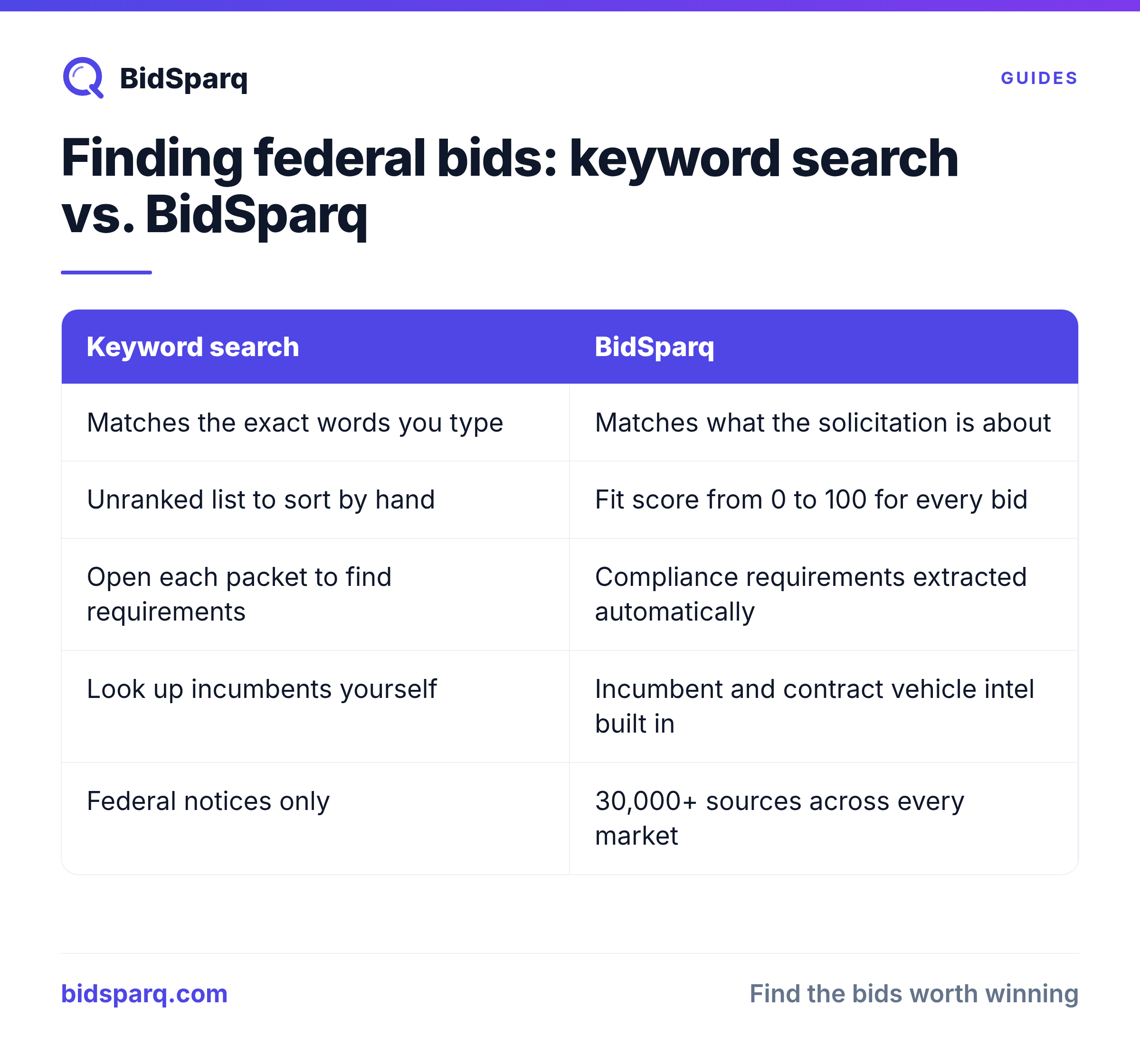
Expect a keyword search to return both noise and gaps, and budget your time for both. Words carry several meanings across industries. As of November 2026, 3,887 of the 52,675 solicitations open across the 33,000+ sources BidSparq tracks mention the word "search". Those include records management, recruiting, software and field services, all lumped together under one term. Type in a term and you get a stack to sort by hand.
The gaps hurt more. A facilities contractor searching "roof replacement" can miss a notice titled "building envelope repair." An IT firm searching "help desk" can miss "Tier 1 end user support services." A medical supplier can miss a requirement described only by product category. Nobody made a mistake. The buyer just used different words. So most teams keep adding keywords, re-reading the same results and opening attachments one at a time to find the requirements that decide go or no-go. That reading takes hours every week, and it grows as you add codes and regions.
Semantic matching takes on that sorting. It reads what a solicitation is about, not just which words it contains, and scores each one 0 to 100 against your company profile, so you start with the strongest fits instead of a raw list. Compliance requirements are pulled out automatically, so you can see certifications, bonding and submission rules before you read the full packet.
Stop rebuilding keyword lists by hand. See your scored bid matches free for 14 days, no credit card needed.
Read the award history before you commit
Look up the incumbent and the contract vehicle before you spend a proposal budget. USAspending.gov shows past federal awards by agency, NAICS code and recipient, so you can see who did this work last time and roughly how it was scoped. If the requirement is being bought through a vehicle like a GSA Multiple Award Schedule or a governmentwide acquisition contract, only vehicle holders can compete, and much of that activity runs through GSA eBuy instead of a public notice.
That context changes the decision. An incumbent with a strong record and a recompete that looks written around their approach is a hard win. A requirement that moved to a vehicle you don't hold may not be winnable this cycle at all. Doing this lookup by hand for every notice is slow, which is why automated incumbent and vehicle intel saves the most time on the bids you would otherwise talk yourself into.
Triage by deadline and widen past federal
Sort what you find by closing date, then decide quickly. Short windows are common. Right now, 1,193 of the solicitations that mention "search" close within the next 14 days, and that pattern holds across categories: a lot of open work is already close to its deadline by the time a manual search finds it. Make a go or no-go call within a day of finding a notice, and put submission dates on a shared calendar.
Also check how much of your market is federal at all. The same construction, IT and healthcare services that agencies buy are also purchased by states, cities, school districts, hospital systems and private companies, each posting on their own portals. If federal is one channel for you, not the whole business, a single view across all of those buyers is worth more than a perfect SAM.gov filter.
FAQ
Is FedBizOpps still available?
No. FedBizOpps (FBO.gov) was retired in 2019, and its contract opportunity notices moved to SAM.gov. Old FBO links redirect or stop working, so bookmark the Contract Opportunities section of SAM.gov instead.
What replaced FedBizOpps for federal contract opportunities?
SAM.gov replaced it. The Contract Opportunities section holds presolicitations, sources sought notices, solicitations and award notices. The same site handles entity registration, which you need to complete before you can receive a federal award.
How do I search federal contract opportunities by NAICS code?
On SAM.gov, open Contract Opportunities, enter your NAICS codes in the filter panel, and add notice type and set-aside filters. Save the search and turn on email notifications. Check product service codes too, because some buyers' notices are easier to find by PSC than by NAICS.
A good federal search should get you to the right bids faster. Try our AI bid matching software with a 14-day free trial and see which open solicitations actually fit your business.
Find RFPs that match your business
BidSparq monitors 33,000+ procurement sources and uses AI to score every opportunity against your capabilities. Try it free for 14 days.
Start Free Trial →