FedBizOpps Gov Website: Where Federal Bids Live Now
The fedbizopps gov website retired in 2019 and now redirects to SAM.gov. Here is where federal bids live today, how to search them well, and what the portal still misses.
The FedBizOpps gov website no longer exists, and the bookmark most contractors saved years ago now redirects to SAM.gov. That part is easy to fix. The harder problem is the habit it left behind: treating one federal portal as the whole market, running the same keyword searches every morning, and discovering too late that the opportunities worth winning were posted somewhere else, or were worded in a way the search never caught.
- Old fbo.gov notice links usually land on a generic SAM.gov page, so anything in your pipeline that references FedBizOpps needs to be re-found by notice ID.
- Sources sought notices are the earliest public signal of a federal buy, and the stage where a small firm can still influence a set-aside decision.
- If your alert needs an exact word, it stays silent when an agency calls a website rebuild a digital modernization effort.
- Incumbent and contract vehicle intelligence is not in the notice; it lives in award data that has to be joined by hand or by software.
- Outside SAM.gov, education, healthcare, state, local and commercial buyers post on their own portals, and that is where most winnable bids live.
The short answer
The FedBizOpps gov website (fbo.gov) was shut down in November 2019, and federal contract opportunities are now posted on SAM.gov under Contract Opportunities. SAM.gov is run by the General Services Administration and consolidates the old FBO notices with entity registration, exclusion records and wage determinations in one system. Anyone can search and read federal solicitations there without logging in, but to submit a bid or receive an award your business needs an active SAM.gov entity registration and a Unique Entity ID. SAM.gov carries only federal notices above the publicizing threshold, so state, local, education, healthcare and commercial bids never appear there.
What the FedBizOpps gov website was, and what replaced it
Replace every fbo.gov bookmark and saved search with SAM.gov Contract Opportunities, then relearn the filters before you trust the results. For close to two decades FedBizOpps was the federal government's single point of entry for contract notices: presolicitations, sources sought, full solicitations, amendments and award notices all landed there. In November 2019 the General Services Administration folded it into SAM.gov as part of a broader effort to merge separate federal procurement systems into one login. The notice types survived the move, and so did the core search filters for NAICS code, product service code, set-aside type, place of performance and response deadline. What changed is the interface, and the fact that entity registration now sits one tab away from the opportunities themselves.
Two things trip up returning users. Old fbo.gov links to specific notices often resolve to a generic landing page rather than the original record, so historical references in your pipeline need to be re-found by notice ID or title. And the SAM.gov follow and saved search alerts are keyword and filter based, which means they behave exactly like the FBO alerts most teams eventually stopped reading.
How to search SAM.gov without missing what FedBizOpps users expect to find
Build your saved searches on NAICS codes, product service codes and set-aside status first, and treat keywords as a secondary filter. Start with the codes agencies actually assign, because a contracting officer picks a NAICS code for every notice but writes the title in whatever words come to mind. Add sources sought and presolicitation notice types to your alerts; they are the earliest public signal that an agency is shaping a requirement, and responding to them is how small firms influence set-aside decisions. Then widen the view beyond SAM.gov. FPDS and USAspending.gov show who currently holds the contracts you want and when they expire. GSA eBuy carries requests for quotes that only schedule holders can see. Most large agencies also publish an acquisition forecast page listing planned buys for the coming year.
Consider two federal pursuits that look nothing alike. A web agency chasing an agency website redesign will find plenty of volume: as of October 2026, 2,942 open solicitations mention website across the sources we track, and 1,395 of them close within the next 14 days. A specialty construction contractor pursuing a roofing or renovation project at a federal facility sees far fewer notices, and the ones that matter are often buried under generic titles like repair and alteration. Both teams need the same thing: a way to find the right notice before the deadline, without reading everything.
Why one federal portal was never the whole market
Stop treating the federal portal as the market; it is a single source, and most bids your business could win are posted somewhere else. SAM.gov carries only federal notices above the publicizing threshold. Everything below that line, every state and local agency, every school district, hospital system, university and private company that issues RFPs runs its own portal or posts to a regional aggregator. As of October 2026, 54,784 solicitations are open across the 23,000+ sources we track, and 4,498 new website solicitations alone were posted in the last 30 days. No team can read that by hand.
The manual version of this job looks the same whether a firm sells web development or commercial roofing. Someone logs into a dozen portals, runs the same keyword searches, skims titles, opens the ones that look promising, reads 40 to 80 pages to find the page limits, certifications, past performance requirements and submission format, then rechecks for amendments until the deadline. Multiply that across every portal that matters and the real cost is not the hours. It is the bids that were never opened because the title did not contain the keyword.
Start free and see which open bids actually match your work, no credit card needed.
What keyword search misses, and what automated matching catches
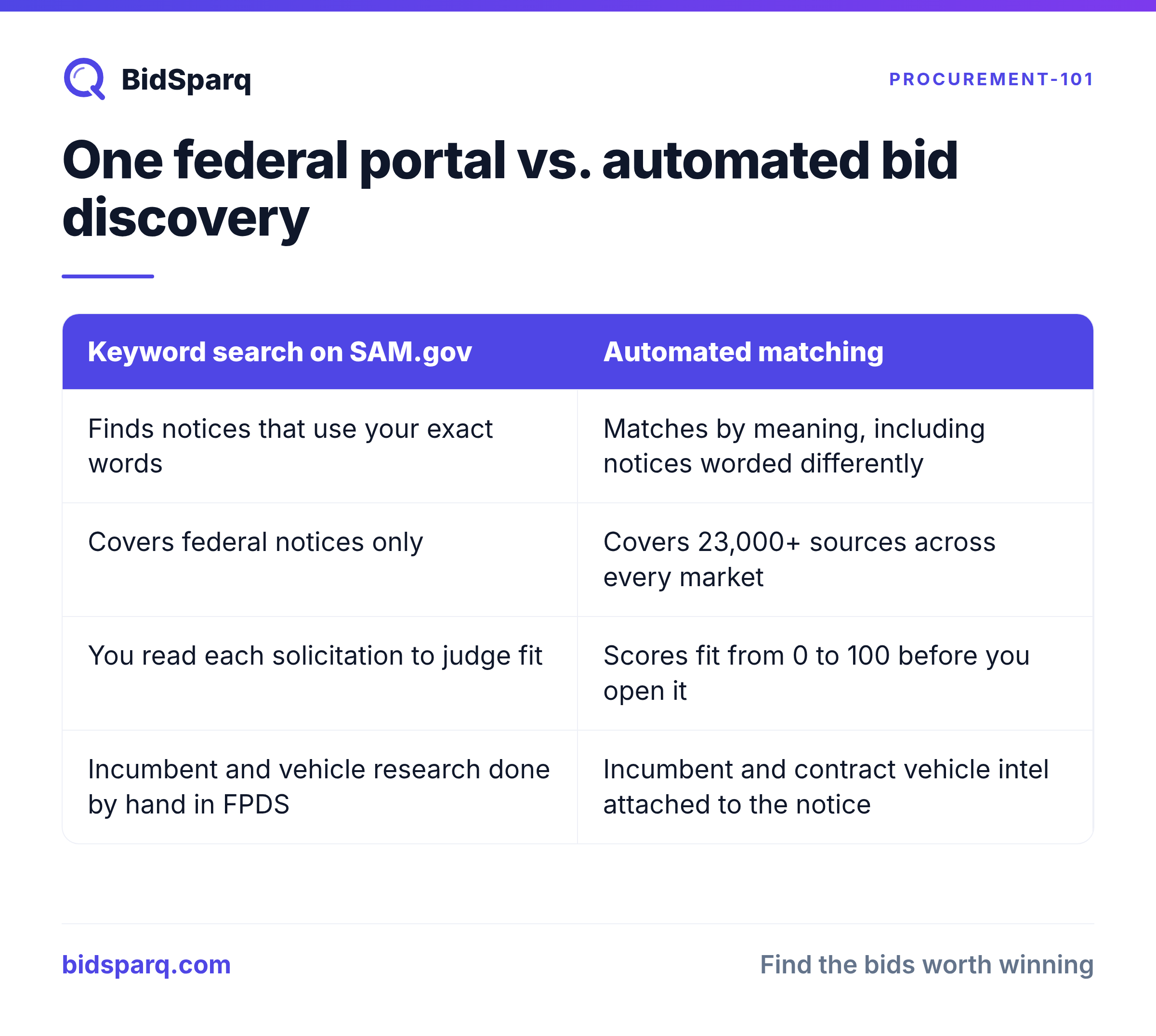
Judge any discovery tool by whether it reads the full solicitation and tells you how well it fits, not by how many alerts it sends. A keyword alert on SAM.gov fires when the title or description contains your term. It stays silent when an agency describes a website rebuild as a digital experience modernization or a roofing project as building envelope repairs. Semantic matching reads the notice for meaning, so a solicitation that describes your work in unfamiliar words still surfaces. A fit score from 0 to 100 then ranks everything that surfaced, which is the difference between a feed of several hundred possible notices and a ranked shortlist worth a bid decision this week.
The second gap is everything that happens after you find the notice. Requirement extraction pulls the compliance details, such as page limits, required certifications, insurance thresholds and submission formats, out of the PDF and into a checklist, so the go or no-go call takes minutes instead of an afternoon. Incumbent and contract vehicle intelligence answers the question FedBizOpps never did: who holds this work today, under which vehicle, and whether a newcomer has a realistic shot. BidSparq attaches both to the notice automatically, which is work a team using the portal alone has to repeat by hand in FPDS and USAspending.gov for every pursuit.
A federal bid discovery routine that holds up after FedBizOpps
Run discovery as a weekly system with written criteria, not as a daily scroll through a portal. Write down the NAICS codes and set-aside categories you will actually pursue, and decline everything outside them without debate. Monitor sources sought notices as a separate stream, because responding early shapes whether a requirement becomes a small business set-aside at all. Pull expiring contracts in your codes from FPDS twelve months ahead and treat each one as a future solicitation. Keep one shared tracker for amendments and question deadlines, since a missed amendment can disqualify an otherwise strong bid. And whether you use SAM.gov alerts or an automated matching tool, review the misses quarterly: the notices you found late or never saw tell you exactly which words your search was missing.
The federal portal is still essential, and still free. It was just never designed to tell you which of its notices you can win, and it was never meant to show you the rest of the market. Try the free tier and get your first ranked matches today, no credit card needed.
Update the bookmark, then fix the habit.
FAQ
Is the FedBizOpps gov website still active?
No. FedBizOpps (fbo.gov) was retired in November 2019. The address now redirects to SAM.gov, where federal contract opportunities are posted under Contract Opportunities. Any guide, bookmark or training material that still points to fbo.gov is out of date.
What replaced FedBizOpps for federal contract opportunities?
SAM.gov, managed by the General Services Administration, replaced FedBizOpps. It combines the old opportunity notices with entity registration, exclusion records and wage determinations. You can search opportunities without an account, set up saved searches, and follow individual notices to receive amendment alerts.
Do I need to register in SAM.gov to see federal bids?
No registration is needed to search or read federal solicitations on SAM.gov. You do need an active entity registration and a Unique Entity ID to submit a bid and receive an award. Registration is free, so be wary of third party services that charge for it.
Find RFPs that match your business
BidSparq monitors 23,000+ procurement sources and uses AI to score every opportunity against your capabilities. Try it free for 14 days.
Start Free Trial →