CVE Watch: How to Monitor Vulnerabilities and Find Security RFPs
A CVE watch tracks the new vulnerabilities that affect your systems. Learn how to run one with KEV, EPSS and CPE filters, and how security vendors find the RFPs that pay for it.
Most CVE watches fail for the same reason: they track every new vulnerability instead of the few that affect the products you run and are being exploited. Security vendors have a second gap. They watch the vulnerability feeds closely and still miss the solicitations where buyers pay for that exact work, because those bids almost never use the words "CVE watch".
- A CVE watch is a filter, not a feed. Its job is to cut the daily stream of new CVEs down to the ones that touch your products.
- Prioritize by exploitation, not raw severity. Check the CISA KEV catalog first, then EPSS, and use CVSS as impact context.
- Filter by vendor and product using CPE names so alerts map to your real asset inventory.
- Buyers purchase this work under other names, such as vulnerability management services or managed detection and response.
- Qualify security RFPs on codes, vehicles and certifications before you spend time on scope or price.
The short answer
A CVE watch is the ongoing practice of monitoring newly published Common Vulnerabilities and Exposures, filtering them to the products you run, and acting on the ones most likely to be exploited. The core sources are free: the CVE Program at cve.org, the NIST National Vulnerability Database (NVD), the CISA Known Exploited Vulnerabilities (KEV) catalog, and your vendors' own security advisories. A good watch ranks by KEV status and EPSS score before CVSS severity. For security vendors there is a counterpart on the sales side: watching for the RFPs where organizations buy vulnerability monitoring as a service.
How to run a CVE watch
Start with your asset inventory, because a CVE only matters if it affects something you operate. The steps below turn a flood of advisories into a short, ranked work list.
- Map your inventory to CPE names. Common Platform Enumeration (CPE) is the standard naming scheme for vendors, products and versions. NVD tags CVEs with the CPE names they affect, so a watch list built on CPE matches your software and hardware instead of guessing with keywords.
- Subscribe to the primary feeds. Pull new records from cve.org and the NVD data feeds or API, and subscribe to CISA KEV updates. Add the security advisory channels of every vendor in your stack. NVD enrichment can lag behind publication, so vendor advisories are often the first place affected versions and fixes appear.
- Rank by exploitation first. A CVE listed in KEV has confirmed exploitation in the wild and goes to the top of the queue. Next, check its EPSS score, the Exploit Prediction Scoring System estimate of how likely exploitation is in the next 30 days. Use CVSS last, as a measure of impact if the flaw is exploited. Sorting by CVSS alone buries your team in critical-rated issues that attackers never touch.
- Set remediation timelines by tier. Define how fast each tier must be patched or mitigated, and record every decision, including accepted risk.
- Verify the fix. Rescan after patching and close the item only when the scan confirms it.
This is the routine buyers want when they outsource vulnerability management. A SaaS company preparing for a SOC 2 audit and a regional bank facing examiner questions both need evidence that the loop runs on schedule, and many pay a provider to run it.
Where vulnerability management RFPs are posted
Demand for this work is spread across every sector, and no single portal lists it. Federal opportunities appear on SAM.gov. State and local agencies post on their own eProcurement portals. Universities, utilities, transit authorities and health systems run separate bid sites, and commercial buyers such as software firms, banks and logistics companies issue RFPs through supplier portals or directly to invited vendors. Government is one vertical among several, and vendors who only watch federal listings see a fraction of the market.
The vocabulary is the bigger obstacle. Buyers describe the service they want, so the titles read like this:
- "Vulnerability Management Services"
- "Managed Detection and Response (MDR)"
- "Penetration Testing and Remediation"
- "Managed Security Services Provider for Continuous Monitoring"
Often the security scope has no title of its own and sits inside a managed IT services contract or a system replacement. Keyword alerts fail in both directions here. As of November 2026, 55,306 solicitations are open right now across the 33,000+ sources BidSparq tracks, and 61 of the open solicitations mention "watch", yet the word alone cannot tell you which of those involve security at all, while a bid for "continuous vulnerability scanning with remediation reporting" matches none of your search terms.
Rather than building keyword lists for every phrasing, describe your security services once and see open bids ranked by fit, each with a 0 to 100 score and its requirements already extracted. The trial is free for 14 days with no credit card.
How to find security RFPs by meaning, not keywords
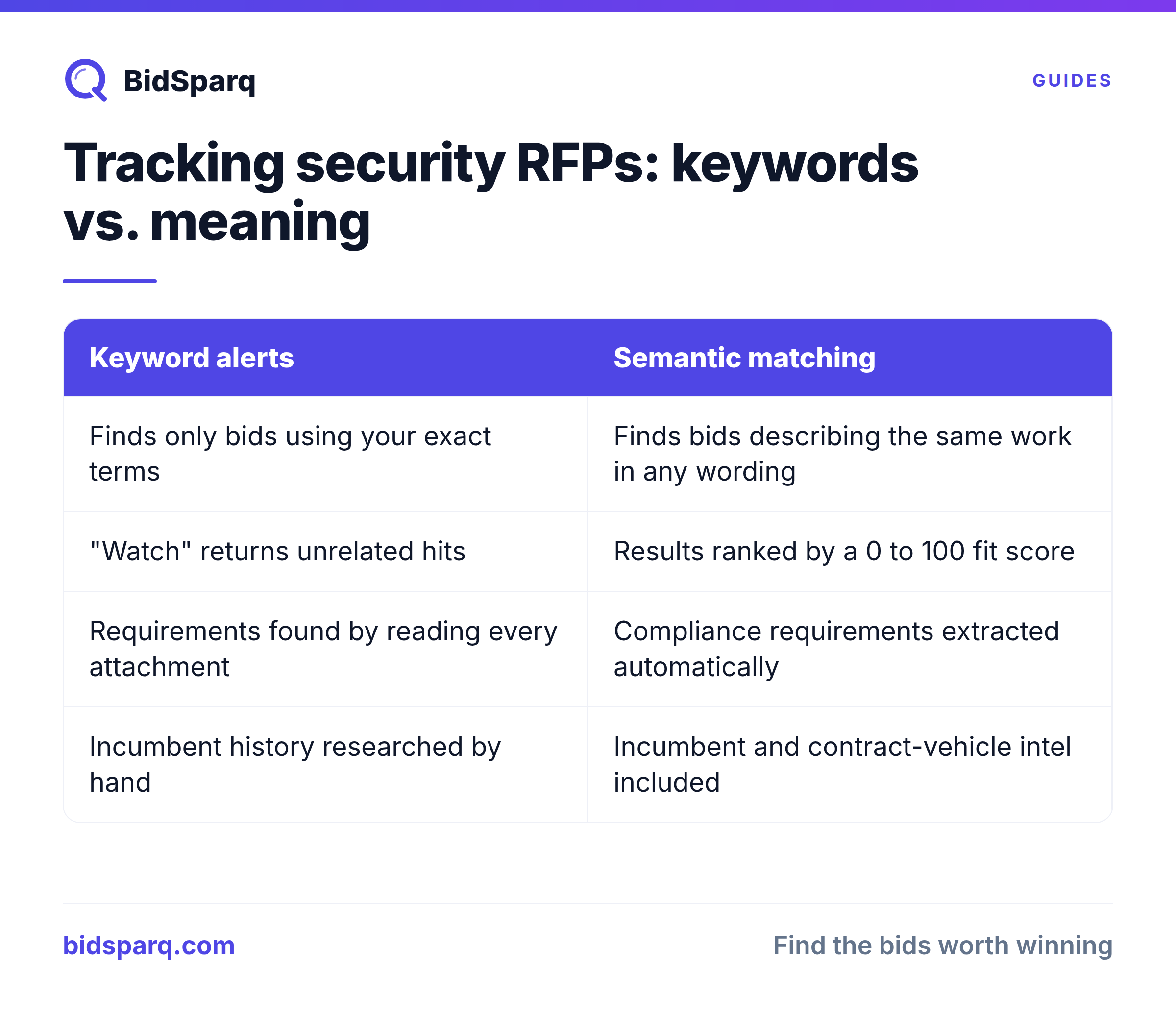
Matching on meaning solves the vocabulary problem that keyword tools cannot. A keyword alert needs you to guess every phrase a buyer might use, then read through the noise each guess produces. Semantic matching works the other way: you describe your services in plain language, and the system reads what each solicitation asks for. A request for patch management, exposure monitoring or MDR surfaces even when the title says "IT support services".
Matching still leaves a list to sort. In BidSparq, every opportunity carries an AI fit score from 0 to 100, so the bids closest to your capabilities rise to the top. Doing that first cut manually means someone opens each document and judges relevance unaided. The score does it automatically, and your team's review hours go to pursuits worth winning.
How to qualify a security RFP
Check the gating requirements before you read the scope. Security bids are dense with conditions that disqualify vendors before price is considered. Run each opportunity through this checklist:
| Check | What to look for |
|---|---|
| NAICS code | Most security services bids use 541512 (Computer Systems Design Services) or 541519 (Other Computer Related Services). Confirm your registration lists the code named in the solicitation. |
| Federal vehicle | Many federal buys run through the GSA Multiple Award Schedule under SIN 54151HACS, Highly Adaptive Cybersecurity Services. Without that SIN, you need a teaming partner who holds it. |
| Cooperative vehicle | State, local and education buyers often purchase through NASPO ValuePoint or other cooperative contracts. If the buy is limited to contract holders, an open proposal will not be accepted. |
| Certifications | SOC 2 reports are a common requirement in commercial and public bids. CMMC applies to defense work, FedRAMP to cloud services sold to federal agencies, and StateRAMP (now GovRAMP) to many state and local cloud purchases. |
| Contract terms | Cyber insurance minimums, background checks, data residency and response-time commitments. |
| Incumbent | Who holds the work today, and whether this is an open competition or a renewal. |
Doing this by hand means reading every attachment. Automated compliance extraction pulls the certifications, insurance terms and deadlines out of the documents so you can see in minutes whether you qualify. Incumbent and contract-vehicle intelligence shows who holds the contract now and how the buyer has purchased before, which tells you whether the bid is truly open. For federal pursuits, cross-check the details on SAM.gov. For state and local work, confirm them on the buyer's official eProcurement portal.
A practical next step for this week: subscribe to CISA KEV updates, build the CPE list for your top products, and write a two-sentence description of the security services you sell. The first two tighten your vulnerability watch. The third is all you need to start a buyer watch.
FAQ
Is CVE the same as the VA Center for Verification and Evaluation?
No. In cybersecurity, CVE stands for Common Vulnerabilities and Exposures, the public catalog of disclosed security flaws. The Center for Verification and Evaluation was the Department of Veterans Affairs office that verified veteran-owned small businesses, a function that has since moved to the Small Business Administration. If you are looking for veteran-owned business certification, the SBA is now the place to go.
What is the best way to prioritize CVEs?
Check the CISA KEV catalog first, since a listing there means the vulnerability is being exploited in the wild. Then use the EPSS score to estimate how likely exploitation is in the next 30 days, and use CVSS to understand the impact if it happens. Apply all three only to CVEs that match your own products by CPE name.
Where can I find RFPs for vulnerability management services?
They are posted across federal, state, local, education, healthcare and commercial procurement portals, often under titles like managed security services, penetration testing or managed IT. SAM.gov covers federal opportunities, and state eProcurement portals cover much of the public sector. A discovery platform that matches by meaning will surface the bids that never use your exact keywords.
Ready to run the buyer watch alongside your CVE watch? Start your 14-day free trial, enter a short description of your security services, and review scored matches with certifications and deadlines already pulled out in your first session. No credit card is required, and Pro Max is $249/mo ($199/mo billed annually) if you continue.
Find RFPs that match your business
BidSparq monitors 33,000+ procurement sources and uses AI to score every opportunity against your capabilities. Try it free for 14 days.
Start Free Trial →