Biddaro Alternatives: What to Compare Before You Switch
Comparing Biddaro alternatives? Learn what to check on coverage, semantic matching, fit scoring, compliance extraction, and incumbent intel, plus how to run a fair trial.
Most teams start looking at Biddaro alternatives for one of two reasons. Bids they should have chased reach them too late or never reach them at all, or their inbox is full of alerts for work they would never pursue. Either way the team loses hours every week, and switching tools fixes neither problem unless the new tool finds, filters, and qualifies opportunities differently. If a new dashboard runs the same keyword logic, you will keep missing the same bids and getting the same noise.
- Coverage decides everything else: if a tool skips the portals your buyers use, no other feature can make up for it.
- Keyword alerts break when a buyer uses different words, and procurement documents are full of words that have nothing to do with what is being bought.
- Most qualifying time goes into reading the package, so automated compliance extraction saves more time than faster alerts.
- Incumbent and contract-vehicle intel show whether a bid is winnable before your team spends a week on it.
- The fairest test is your own history: run last quarter's won, lost, and missed bids through every trial and count the results.
The short answer
Switch from Biddaro if you can name bids you lost to coverage gaps or keyword noise. If you can't, stay. Teams that sell into several markets at once, such as healthcare, education, construction, commercial, and government, get the most from a tool that matches by meaning and does the first round of qualifying automatically. A team that bids through one portal and already sees every relevant notice has little to gain from moving. The deciding test is simple: give each candidate the bids you missed last quarter and see which one would have found them in time.
What to check in Biddaro and each alternative
Compare categories of tools first, then the individual vendors inside the category that fits you. Biddaro is a bid discovery service: it gathers public solicitations and sends subscribers alerts based on their profile. You can check most of what matters without a sales call. Its website shows which markets and regions it says it covers. The signup or settings flow shows whether you set alerts with keywords and category codes or by describing what you do. A free trial or demo shows whether bids come with a fit ranking and whether requirements are pulled out of the documents, or whether you get a link to the package and nothing more. Ask the same questions of every tool below. Features change, so treat the table as a checklist for your trials and confirm current capabilities on each vendor's own site.
| Option | Real examples | Source coverage | Matching type | Fit scoring | Compliance extraction | Incumbent intel |
|---|---|---|---|---|---|---|
| Biddaro | Biddaro | Check its stated markets and regions against your buyer list | Check whether alerts come from keywords, codes, or a description of your work | Check in a trial whether results are ranked by fit | Check in a trial whether requirements are extracted or you only get the package | Check whether award history or current holders are shown |
| Free public portals | SAM.gov, state eProcurement sites, district board agendas on BoardDocs | One jurisdiction or buyer per portal | Manual search or saved keywords | None | None, you read the package | Limited, usually a separate award search |
| Keyword alert aggregators | BidNet Direct, DemandStar, BidPrime | Varies, usually weighted toward state and local government | Keywords and category codes | Rarely | Rarely | Rarely |
| Government intelligence platforms | Deltek GovWin IQ, GovSpend, HigherGov | Deep on public sector, thin on commercial and private healthcare | Keywords plus filters | Sometimes | Sometimes | Often strong, especially federal |
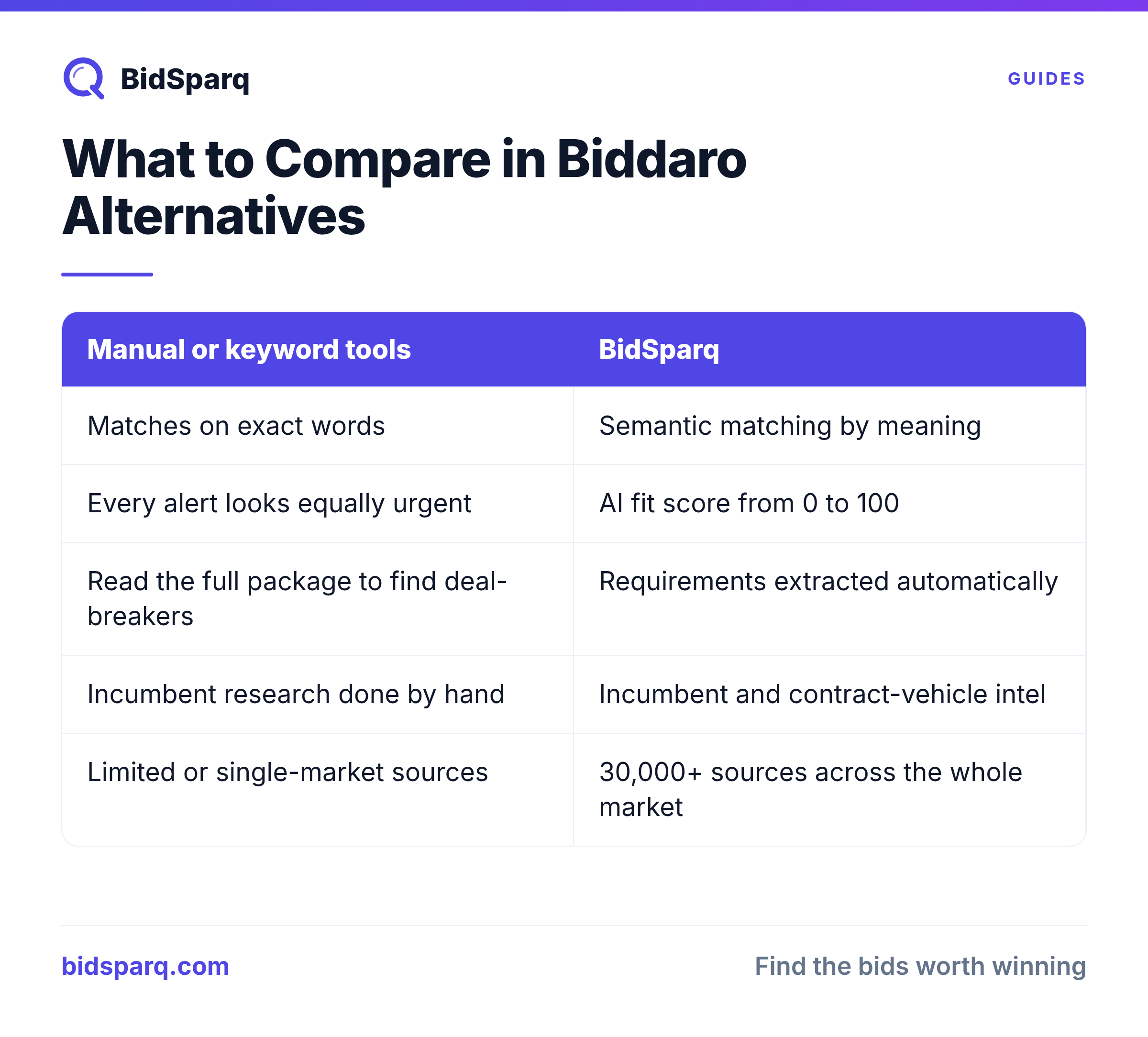
| AI semantic matching platforms | BidSparq | 33,000+ sources across commercial, education, healthcare, construction, and government | Semantic, by meaning | Automated 0 to 100 fit score | Automated extraction of deal-breakers | Incumbent and contract-vehicle intel |
A team selling only to federal agencies may be well served by a government intelligence platform. A team whose buyers include hospital systems, school districts, and private owners alongside public agencies needs broader coverage than any single-sector tool offers.
Coverage and the hidden cost of manual qualifying
Write down your real buyers before you look at anyone's source count. A medical equipment distributor sells to hospital systems, and many of them run their own supplier portals. A K-12 technology reseller follows districts that post on their own websites and preview upcoming purchases in board agendas. A general contractor needs city, university, and private developer invitations in one place. Federal work is posted on SAM.gov, and state work sits on each state's eProcurement portal. A big source count only helps if your buyers are in it.
Coverage and filtering have to be judged together, because the volume is too large for people to sort. As of November 2026, 54,794 solicitations are open across the 33,000+ sources we track. Every portal a tool skips becomes one more site someone on your team checks by hand. On top of that come the alerts that turn out to be irrelevant and the packages with a disqualifying requirement buried deep inside. To put a number on it, have your team log every minute spent finding and qualifying bids outside your current tool for two weeks. Double that figure to get a monthly cost and compare it with the subscription price of each option on your shortlist. Most teams find that manual qualifying costs more than any subscription.
See which relevant bids your current feed is missing with a 14-day free trial, no credit card needed.
Keyword alerts vs. semantic matching
Run one identical search in every tool you're evaluating and read every result it returns. Keyword tools take words literally, and procurement language is full of words that say nothing about what is being bought. As of November 2026, 176 open solicitations mention "alternatives", mostly because buyers are inviting bid alternates or substitute products, not because they want anything a software vendor sells. A keyword alert on that word would send you all 176.
Missed bids cost more than noise. A hospital asking for "environmental services" may want exactly the janitorial work a cleaning contractor does, yet a keyword alert built on "janitorial" and "custodial" would never catch it. Semantic matching reads what a solicitation is asking for and compares it with what you actually do. It surfaces the bid you would have missed and drops the one that only shared a word with your profile.
Here is how that plays out on a single solicitation. Say a regional hospital district posts an RFP for environmental services at its outpatient clinics.
- Matching: a keyword tool set up for "janitorial" stays silent. A semantic tool recognizes the RFP as cleaning work and sends it to the cleaning contractor.
- Fit scoring: instead of a raw alert, the bid comes with a 0 to 100 score based on how closely the scope, facility type, and location match the contractor's profile. Your team can decide where it ranks against the rest of the week's list without opening it.
- Compliance extraction: the requirements that decide go or no-go are pulled to the top: the insurance minimums, any required licenses or healthcare cleaning certifications, a mandatory site walk, the submission method, and the due date. If the site walk has already happened, you know before anyone reads the package.
- Incumbent intel: you see who holds the current contract and whether the district could buy through a cooperative or existing vehicle instead. That tells you whether you are facing an open competition or a renewal that is hard to unseat.
With a keyword tool, each of those steps is manual work for someone on your team, repeated for every alert. With an automated platform, the reading is done for you and your team starts at the decision.
How to run a fair trial
Build your test set from last quarter's real bids before you start any trial. Sort them into three groups: bids you won, bids you lost, and bids you found too late or never found. The third group tells you the most, because it shows exactly where your current tool fails.
For each tool on your shortlist, track four things in a simple spreadsheet:
- Hits: which bids from your test set it surfaced, especially from the missed group.
- Noise: how many irrelevant results came with them.
- Qualifying time: how long it took your team to decide go or no-go on the good ones.
- Deal-breakers caught: whether it flagged a disqualifying requirement you would otherwise have found only after reading the full package.
Run trials at the same time where you can, so every tool sees the same live opportunities. Have the same person score each tool so differences come from the software, not the reviewer. Confirm each vendor's current features in its own documentation rather than trusting old comparison pages, including any comparison about us. Two weeks of results on your own pipeline will tell you more than any vendor's marketing.
FAQ
What is the best alternative to Biddaro?
It depends on where your buyers post and how much qualifying you want automated. Federal-only teams often look at government intelligence platforms. Teams selling across commercial, education, healthcare, construction, and government buyers should look for broad coverage and matching by meaning instead of keywords. Whichever you consider, test it against bids you already know you wanted.
How do I compare RFP discovery tools?
Score them on five criteria: source coverage for your specific buyers, matching type, fit scoring, compliance extraction, and incumbent intel. Run the same set of past opportunities through each trial and count hits, misses, irrelevant results, and the time it takes to qualify each one.
Is there a free alternative to Biddaro?
SAM.gov, state eProcurement portals, and district board agendas are free to search, but someone has to check each one by hand. BidSparq offers a 14-day free trial with no credit card. After that, the Pro Max plan is $249 per month, or $199 per month billed annually.
The fastest way to settle the switching question is to test it on your own bids. Load your missed bids into a free 14-day trial and get an answer from your own data in two weeks: what the tool would have found, how it would have scored each bid, and which deal-breakers it would have flagged before anyone opened the package.
Find RFPs that match your business
BidSparq monitors 33,000+ procurement sources and uses AI to score every opportunity against your capabilities. Try it free for 14 days.
Start Free Trial →